How do I turn Instagram Reels into notes?
By Parth Akholkar, who makes Skwirl · 18 November 2026
What belongs in a note you can actually use?
Decide what you saved the reel to do. For a tutorial, keep the steps and the settings you would need next time. For a recommendation, keep the exact name and the reason it was recommended. For a recipe, keep quantities, heat and timing if the creator supplies them. A note that answers one of those needs can stay short even when the reel itself is dense.
Put the most searchable words in the title. If you remember a tutorial as “turn a tote into a camera bag,” use that phrase, even if the caption is just “my travel hack.” Keep the original link and creator so you can check the source later, especially when on-screen instructions and the caption differ.
How do you turn a reel into a note by hand?
- Copy the link. Open the reel, use Instagram’s share controls to copy its link, and paste the link into a new note in the app you already use.
- Write why you saved it. In one sentence, say what you want to take from the reel. If there is a next action, phrase the title around the thing you would search for later.
- Rewatch for specific details. Pause on numbers, names and steps. Expand the caption and check whether it supplies a missing ingredient, setting or source. Record a timestamp for any instruction that will be easier to see than to describe.
- Separate the source from your additions. Label any substitution or idea you want to test as your own. If the reel gives no exact quantity or time, leave that field open so a guess does not become part of the instructions.
- Try finding the note again. Search your notes using a clue you remember without looking at the caption. If the note is hard to find, add that clue to the title or first line.
A simple template gives you enough structure without transcribing the entire clip. For a multi-step process, add a numbered list under the takeaway.
Title: The phrase you would search for
Source: Reel link and creator
Takeaway: The detail worth keeping and where it appears
Next action: What you plan to try or verify
When does automatic extraction save time?
If you have several public reels to process, copy the link to Skwirl, sign in and paste it into the save box. Wait for the reading card to become a note. Open it and check the extracted summary against the source. Depending on the post, Skwirl can use what is spoken or shown and details from the caption or available comments. A recipe can become ingredients and steps, and the resulting note can be found by keyword or meaning. See the Skwirl app’s garlic butter pasta note.
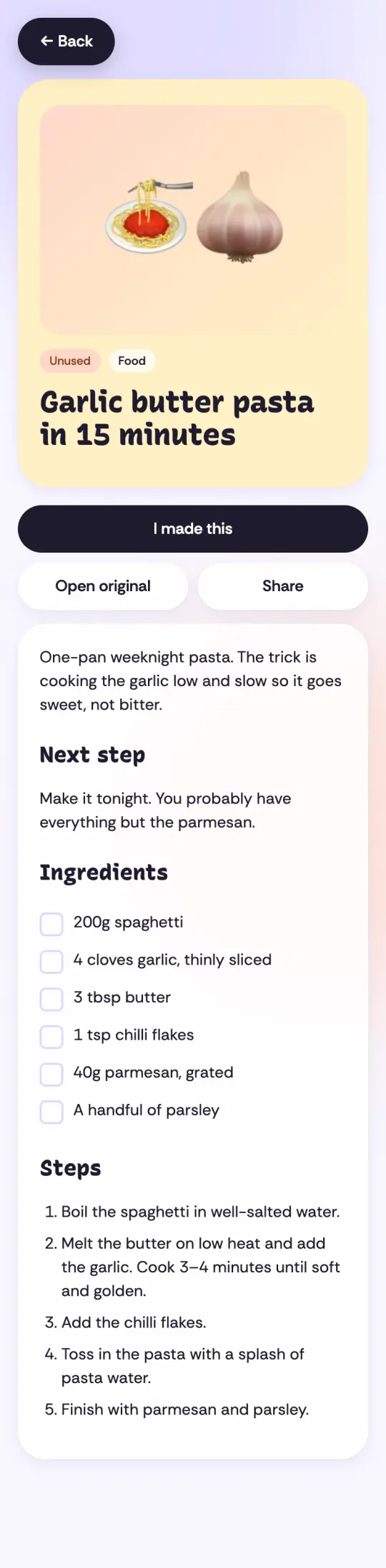
From the note: Cook the garlic over low heat for 3 to 4 minutes, until soft and golden.
What to check: The heat setting and the visual cue matter as much as the timer. Rewatch that part of the reel before using the instruction.
Manually check anything that could change the outcome. Read a product model character by character, confirm whether a teaspoon was shorthand for a tablespoon, and check whether an instruction belonged to the creator or came from a commenter. If the detail is missing in the original, keep it marked as unknown. For a one-off reel, or a private reel you can view through Instagram, writing a short note yourself can be the simpler workflow.
If you primarily want Markdown in your existing iPhone notes workflow, Clip CEO documents individual Markdown and text export. Skwirl’s setup here is for keeping notes in a searchable library. Choose based on where you want to look for the note six weeks from now.
What else should you know about Reel notes?
Does tapping Save in Instagram create a Skwirl note?
No. It bookmarks the reel in Instagram. To make a Skwirl note, share or paste a supported public link, or import your Instagram Saved export.
Do I need a full transcript to make a useful note?
No. Keep the takeaway, the original link and the details needed to act. A timestamp can help you check a longer explanation later.
Can I make a note from a private Reel?
You can write your own note about a reel you have permission to view. Skwirl needs an accessible public link to extract a note reliably.